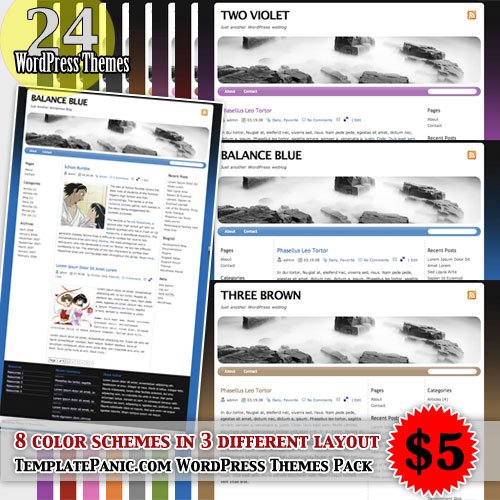
TemplatePanic.com Wordpress Themes Pack

wordpress themes pack

What you’ll get when you buy TemplatePanic.com Wordpress Themes Pack, with only $5:

  • Theme name #1: BALANCE theme. BALANCE Theme is 3 column Wordpress theme with sidebar on the left and right side. You’ll get 8 different color themes.
  • Theme name #2: THREE theme. THREE Theme is 3 column Wordpress theme with sidebar on right side. You’ll get 8 different color themes.
  • Theme name #3: TWO theme. TWO theme is 2 column Wordpress theme with sidebar on the right side. You’ll get 8 different color themes.
  • free upgrades
  • psd of header image

Features:

  • valid HTML and valid CSS
  • widget ready
  • custom image header (upload a custom header image to be shown at the top of your blog instead of the default one)
  • integrated with WP-PageNavi plugin
  • contact form template with spam protection. How to use: Create New Page, name it Contact, and change the Page Template to Contact
  • tested in Wordpress 2.3
  • tested in browser Firefox, Opera, Safari, Camino, IE
  • It is easy to embed adsense code to theme. Adsense code size 160×600 will be fit in sidebar.

Term of Use:

  • for private or business site

  • you are free to keep or remove the credit link in the footer
  • don’t resell or give them out for free

Live Demo:

Buy Now


FAQ


Why buy TemplatePanic.com Wordpress Themes Pack?

I’ve spent a lot of time and effort to create this themes. By purchase TemplatePanic.com Wordpress Themes Pack, it ensures my ability to enhance the theme and provide you with support. And you will get my support about theme you are purchase from here.

How much it cost?

Very cheap. Only $5 includes upgrade.

What kind of payment do you accept?

I only accept PayPal payment.

I am new to Wordpress. How to install Wordpress Theme?
Once you have Wordpress installed in your blog, follow this step:

  • download Wordpress theme, and extract the zip file
  • open your FTP client (since I am using Firefox, I use FireFTP)
  • connect to your user account, and open /yourdomainname.com/wp-content/themes/. Drag the theme folder here.
  • to enable you editing theme from your dashboard, the file need to be writable. You must change the file permission to 0666 (right click on the file, click on properties). For more detail please read this.
  • Now go to your dashboard, and choose Presentation –> Themes. Activate your theme.
  • Done!

How to edit my theme? I want to change the color, header image, etc…

I suggest you to “play” with the style.css (in the Presentation –> Theme Editor). But if you feel confuse, be free to contact me.

For changing header image, don’t worry. All themes have “custom image header”, which means you can upload a custom header image to be shown at the top of your blog instead of the default one.

I do not like the 3 column bottom menu (with black background). How to remove?

Open your dashboard, go to Theme Editor, click on Footer.php and remove this code:

If your question is not listed here, you can contact me using contact form.

Buy Now

Contact us if you have trouble downloading our blog template.

To get new update about our newest templates, please subscribe to TemplatePanic.com.

Enter your email address:

Delivered by FeedBurner

No Comments »

Leave a comment


Comments links could be nofollow free.
  • Subscribe to TemplatePanic.com by Email

    Enter your email address:

    Delivered by FeedBurner

buy templates clixsense