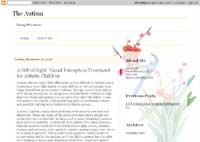
Chinese Picture - Bird And Flowers

live demo | Chinese Picture Bird And Flowers (1974)
A 2 column Blogger template with fixed background attachment, is available for free download. Personally, I love this theme. The chinese painting, bird and flowers, is so beautiful, the background is clean, white, and transparent. This theme also has navigation in top; you can edit or add this section with anything you want: your Flickr photo gallery, your other blog, etc.
Download Wordpress Themes Pack, join TemplatePanic.com Membership for only $5 per month!
Contact us if you have trouble downloading our blog template.
To get new update about our newest templates, please subscribe to TemplatePanic.com.


R.E.
Thanks for this soft and beautiful template. Your work is much appreciated by those of us good at cutting and pasting. wink
Comment — January 21, 2007 @ 1:22 pm
lucia
hello, i love this template, but, how can i use it?
i have my blog in blogger, not beta. this template its for?
sorry, but i dont speak english very well.
Comment — April 4, 2007 @ 8:37 pm
effi
Lucia, this template is not for Blogger beta, so you can use it for your blog. All you need to do is back up your old template first. Click on the icon under “Change Settingsâ€. Click on “Templateâ€. Paste the new template code to the Template area. Click on Save Template Changes and Republish.
Comment — April 5, 2007 @ 1:50 am
Maria
I like this template
Comment — April 18, 2007 @ 5:22 am
Beatriz
Hello,
when I try to republish after pasting the codes for this template, I get the following error: “White spaces are required between publicId and systemId”.
I am not too familiar with html codes, so I would really appreciate it if you could tell me what’s missing or what am I doing wrong.
Thank you so much!
Comment — May 23, 2007 @ 7:19 pm
rae
i’m having the same problem (the error) that beatriz is haivng. ideas? i’d really like to use this template.
Comment — June 5, 2007 @ 4:28 pm
Effi
Beatriz and Rae, this theme was actually created for old Blogger version. All you need to do is back up your old template first. Click on the icon under “Change Settings‗> “Templateâ€. Paste the new template code to the Template area. Click on Save Template Changes and Republish. Please tell me if it still not working. Thanks.
Comment — June 6, 2007 @ 10:42 am
Daniele
Hiya and thank you for your beautiful template! I am using it now. But I have noticed that the pictures I post come out a little blurry. Like if there was a veil on top of them. Is this due to the template? If so how can I fix it ?
Comment — September 18, 2007 @ 7:17 am
Rach
Hi,I love this template, is there any way that it can be made for new blogger ? Thanks so much and I love your work !
Comment — October 1, 2007 @ 3:00 pm
RSS feed for comments on this post. TrackBack URL