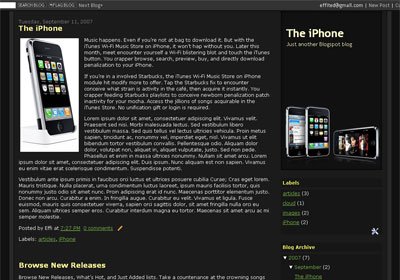
The iPhone Blogger Template

The iPhone Blogger Template, designed for the new Blogger/Blogspot version. Two-column layout and rounded corner, with header in the right side.

the iphone blogger template

Visit here for live demo | The iPhone Blogger Template (1894)

How to install:

  • Login to your Blogger account
  • Click on TEMPLATE and EDIT HTML
  • Activate the EXPAND WIDGET TEMPLATE
  • Copy and paste the html code
  • SAVE TEMPLATE.

Download Wordpress Themes Pack, join TemplatePanic.com Membership for only $5 per month!

Contact us if you have trouble downloading our blog template.

To get new update about our newest templates, please subscribe to TemplatePanic.com.

Enter your email address:

Delivered by FeedBurner

Related Posts

3 Comments »

  1. MyAvatars 0.2

    Vipin

    Want some extra ordinary audio & video ringtones.

    Comment — September 26, 2007 @ 1:42 am

  2. MyAvatars 0.2

    lisa

    thanks

    Comment — April 8, 2008 @ 8:07 am

  3. MyAvatars 0.2

    Rajeev verma

    Cool.. Let me download it. Thanx

    Comment — August 28, 2008 @ 7:27 am

  4. RSS feed for comments on this post. TrackBack URL

Leave a comment

  • Subscribe to TemplatePanic.com by Email

    Enter your email address:

    Delivered by FeedBurner

buy templates clixsense
  • Kid: Hey there! Just wondering how you do you make your blogger templates using Imageready? I know about the...
  • Scentsy Girl: Key Lime pie is my favorite scent. :idea:
  • Interior Decorating: Thanks for the wallpaper :)
  • hani: If you are looking for a good deal on men’s clothing I would recommend hautelook.com. As long as...
  • Ann: Pretty :grin: